
On this page
Managing a VPS from scratch is not exactly a walk in the park. You need to install and configure Nginx or Apache, set up PHP with the right version, create MySQL databases, issue SSL certificates, manage files, set up firewalls, configure backups — and that is before you even deploy a single website. For developers, this is manageable. For bloggers, small business owners, and beginners, it can be genuinely overwhelming.
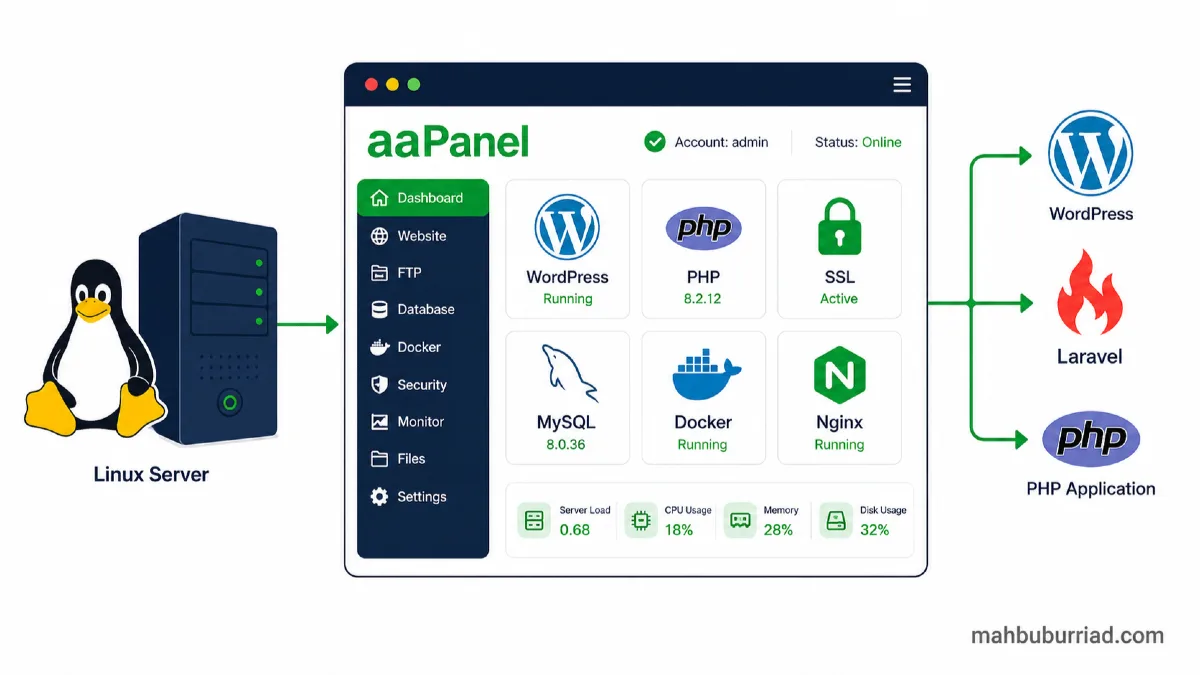
That is where aaPanel comes in. It is a free, open-source Linux hosting control panel that gives you a clean browser-based dashboard to manage everything on your VPS — without memorising a hundred Linux commands. I have used it across several projects and wanted to share an honest breakdown of what it offers, who it is for, and where its limits are.
What is aaPanel?
aaPanel is a free and open-source web hosting control panel designed for Linux servers (Ubuntu, Debian, CentOS, AlmaLinux). It lets you manage websites, PHP versions, MySQL or MariaDB databases, SSL certificates, file uploads, server security, Docker containers, and backups — all from a straightforward web interface.
It was originally built by a Chinese team and has grown into a well-established panel with an English version widely used across Asia, the Middle East, and beyond. The core panel is completely free. Some advanced plugins carry a one-time or subscription cost, but the free tier covers the needs of most small to medium projects.
You can get started here: https://www.aapanel.com?referral_code=fKy9gp5L
Why People Look for a Free cPanel Alternative
cPanel is the most recognised hosting control panel in the industry, and for good reason — it is polished, powerful, and widely supported. But it is also expensive. After Cpanel Inc moved to per-account pricing, the monthly license cost climbed significantly. For a developer managing three or four personal VPS servers, or a freelancer hosting client sites on a budget VPS, that monthly fee adds up fast.
People searching for a free cPanel alternative are usually:
- Running a personal VPS or home server
- Hosting multiple small websites without a reseller account
- Building Laravel or PHP projects on cloud VPS providers like Hetzner, Vultr, or DigitalOcean
- Moving away from shared hosting and learning VPS management for the first time
aaPanel fits this audience well. It is not trying to replace cPanel for large hosting businesses, but for individual developers, bloggers, and small teams — it is genuinely capable.
Key Features of aaPanel
Easy Website Management
Adding a new website in aaPanel takes about thirty seconds. You enter the domain, select your PHP version, choose Nginx or Apache, and it provisions everything including the web root, config file, and virtual host. No manual Nginx config editing required.
One-Click LNMP, LAMP, and OpenLiteSpeed Setup
On first login, aaPanel walks you through installing your preferred web stack. LNMP (Linux, Nginx, MySQL, PHP) and LAMP (with Apache) are both supported. OpenLiteSpeed is also available, which is worth exploring if you host high-traffic WordPress sites.
WordPress Toolkit
aaPanel includes a WordPress manager that handles installation, plugin updates, theme management, and basic WordPress configuration directly from the panel — without needing to log into wp-admin for everything.
Free SSL Certificate Management
aaPanel integrates with Let's Encrypt and optionally with Cloudflare DNS, so you can issue and auto-renew SSL certificates with a single click. It also supports custom SSL uploads for paid certificates.
PHP Version Management
You can install multiple PHP versions side by side and assign different versions to different websites. Switching PHP versions for a site takes one click. This is useful when you have legacy applications running PHP 7.4 alongside newer projects on PHP 8.3.
MySQL and MariaDB Database Management
Creating databases, users, and setting permissions is straightforward. aaPanel ships with phpMyAdmin integration for GUI-based database management. You can also import and export SQL files without touching the terminal.
File Manager and Online Editor
The built-in file manager handles uploads, permissions, archive extraction, and basic editing. It is not as powerful as a proper FTP client, but it covers the common cases — editing a config file, uploading a theme, checking log output.
Docker Manager
aaPanel includes a Docker management interface where you can pull images, run containers, and manage ports. Useful if you run ancillary services like Redis, Meilisearch, or Mailpit alongside your web projects.
Cloudflare Integration
You can connect your Cloudflare account to aaPanel for DNS management and automatic SSL certificate issuance via DNS challenge. This makes it easier to manage wildcard SSL certificates without manual DNS record updates.
Firewall, Fail2Ban, and Nginx WAF
aaPanel includes a basic firewall UI for managing open ports. Fail2Ban can be enabled to automatically block brute-force login attempts. A Nginx WAF plugin is also available for adding basic web application firewall protection.
Backup and Restore
You can configure automated backups to local storage, FTP, or cloud targets. Site files, databases, and panel configurations can all be included. Setting this up properly early is important — aaPanel makes it easy enough that there is no excuse to skip it.
Who Should Use aaPanel?
aaPanel is a solid fit for:
- WordPress users who want full server control without shared hosting limitations
- Laravel and PHP developers who need to manage domains, PHP versions, and databases without maintaining raw Nginx configs
- Bloggers self-hosting their sites on a budget VPS
- Small business owners running two or three company websites
- Freelancers managing client servers without the overhead of a full WHM/cPanel setup
- Students and beginners learning VPS management for the first time
- People migrating from shared hosting who want more control but a gentle learning curve
aaPanel vs cPanel
| Feature | aaPanel | cPanel |
|---|---|---|
| Price | Free (core) | From ~$15–20/month |
| Beginner-friendly | ✅ Yes | ✅ Yes |
| WordPress support | ✅ WordPress Toolkit | ✅ Softaculous |
| PHP management | ✅ Multi-version | ✅ Multi-version |
| SSL management | ✅ Let's Encrypt | ✅ Let's Encrypt |
| File manager | ✅ Built-in | ✅ Built-in |
| Database management | ✅ phpMyAdmin | ✅ phpMyAdmin |
| Docker support | ✅ Yes | ❌ No |
| Best for | Developers, personal VPS, small teams | Shared hosting businesses, large resellers |
To be fair, cPanel is a mature and polished product with excellent support and ecosystem integration. If you are running a shared hosting business or need WHM for reseller management, cPanel is hard to beat. But if you are managing your own VPS for personal or small business projects, aaPanel gives you most of what you need at no licensing cost.
Is aaPanel Good for WordPress?
Yes, it works well for WordPress. You can create a site, install the LNMP or LAMP stack, issue an SSL certificate, install WordPress via the toolkit, and have a running site in under ten minutes. aaPanel also handles PHP version selection per site, which matters when WordPress plugins occasionally have version-specific requirements.
For performance, pairing aaPanel with Nginx and a caching plugin like LiteSpeed Cache or W3 Total Cache gives you a fast WordPress setup. The panel itself does not add much server overhead — it is lightweight.
Backups are easy to schedule, and you can restore individual databases or site files without restoring the whole server.
Is aaPanel Good for Laravel or PHP Projects?
For Laravel, aaPanel handles the infrastructure layer well — domain setup, Nginx virtual host, PHP version selection, database creation, SSL, and file permissions. These are the things you would otherwise configure manually.
That said, the actual Laravel deployment workflow still involves SSH: running composer install, php artisan migrate, setting up queues with Supervisor, configuring cron jobs, managing .env files, and setting storage permissions. aaPanel does not abstract these away, nor should it.
What aaPanel does is reduce the setup friction so you spend less time on server configuration and more time on application logic. For solo developers and small teams, that is a meaningful time saving.
If you are setting up Laravel on a fresh VPS, aaPanel handles the server prep so you can focus on deployment rather than server administration.
Pros and Cons of aaPanel
Pros
- Free core version with genuinely useful features
- Clean, easy-to-navigate dashboard
- Good for VPS beginners who want a GUI
- Supports Nginx, Apache, and OpenLiteSpeed
- Multi-version PHP management
- WordPress toolkit included
- SSL certificate management with auto-renewal
- Docker management without extra tools
- Saves significant setup time compared to manual configuration
Cons
- Beginners still need basic server security knowledge — aaPanel is not a substitute
- Some useful plugins (advanced WAF, monitoring) are paid
- The panel itself needs to be kept updated and secured
- Not ideal for high-scale production environments without additional hardening
- Not a replacement for learning fundamental Linux server concepts
How to Get Started with aaPanel
Getting aaPanel running is straightforward:
- Get a Linux VPS — Ubuntu 22.04 or AlmaLinux 8/9 are both well-supported
- Install aaPanel — run the one-line installation script from the official site
- Log in to the panel — access via
http://your-server-ip:8888 - Install your web stack — choose LNMP, LAMP, or OpenLiteSpeed
- Add a website — enter domain, choose PHP version
- Issue an SSL certificate — one click with Let's Encrypt
- Install WordPress or upload your project — via toolkit or file manager
- Configure backups — set up automated database and file backups
- Review security settings — enable Fail2Ban, check open ports
You can get started with aaPanel here: https://www.aapanel.com?referral_code=fKy9gp5L
Final Recommendation
If you are managing a personal VPS, hosting WordPress sites, building Laravel projects, or just want a clean way to manage a Linux server without writing every config file by hand — aaPanel is worth trying. It is free, actively maintained, and covers the core needs of most solo developers and small teams.
It is not a magic solution that removes the need to understand your server, and some of the more advanced features come with a cost. But as a free cPanel alternative for VPS management, it is one of the most practical tools available today.
Frequently Asked Questions
Is aaPanel free?
Yes. The core aaPanel installation is completely free. Some advanced plugins — such as enhanced monitoring, premium WAF rules, or certain backup destinations — are available as paid add-ons. For most personal and small business use cases, the free version is sufficient.
Is aaPanel better than cPanel?
It depends on your use case. aaPanel is free and covers most individual and small team needs well. cPanel is more mature, has stronger hosting business features, and broader ecosystem support — but carries a monthly licensing cost. For a solo developer or blogger on a budget VPS, aaPanel is often the better practical choice.
Can I host WordPress with aaPanel?
Yes. aaPanel includes a WordPress Toolkit that simplifies installation and management. You can create a site, issue SSL, install WordPress, and configure PHP all from the panel. It works well for personal blogs, business sites, and small WooCommerce stores.
Can I host Laravel with aaPanel?
Yes, with some caveats. aaPanel handles the server infrastructure — Nginx config, PHP version, database, SSL, file permissions. The Laravel deployment itself (Composer, Artisan commands, queues, crons) still requires SSH access. aaPanel makes the server setup significantly easier.
Is aaPanel good for beginners?
Yes, it is one of the more beginner-friendly options for VPS management. That said, beginners should still learn basic server security practices — understanding open ports, keeping software updated, and using strong passwords — because aaPanel does not handle all of that automatically.
Is aaPanel safe for production websites?
It can be, with proper setup. You should secure the panel port, enable Fail2Ban, keep aaPanel and your server packages updated, and configure regular backups. Many developers run production sites on aaPanel without issues. Like any server panel, security depends heavily on how you configure and maintain it.
External Resource
- aaPanel Official Documentation
- Let's Encrypt — Free SSL Certificates
- Laravel Official Deployment Guide
- Ubuntu Server Guide