
On this page
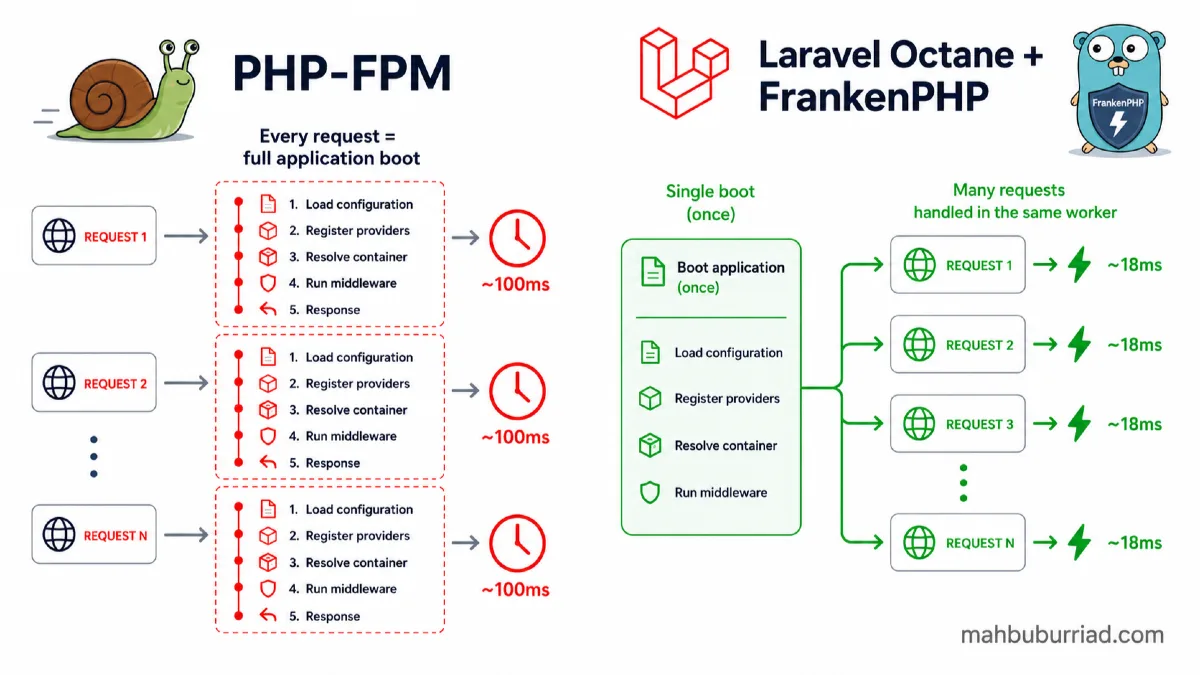
Every PHP-FPM request starts the same way: boot the framework, register service providers, resolve the container, load configuration, run middleware — and only then execute your actual business logic. On a typical Laravel application that is 50 to 150 milliseconds of overhead before your code even runs. Multiply that across hundreds of concurrent requests and you are leaving a significant amount of performance on the table.
Laravel Octane solves this by booting Laravel once and keeping it in memory across requests. FrankenPHP is the modern application server that makes this practical to run in production without the operational complexity that Swoole historically required.
This guide covers what Octane actually does, how FrankenPHP compares to the alternatives, how to set everything up, and — critically — the stateful container pitfalls that catch developers off guard.
What is Laravel Octane?
Laravel Octane is an official first-party package that changes how Laravel handles requests. Instead of the traditional PHP-FPM model where the entire framework bootstraps fresh on every request, Octane starts a long-lived application server that:
- Boots Laravel once at startup
- Keeps the service container, routes, configuration, and middleware in memory
- Handles incoming requests using that already-booted application state
- Serves the response and resets only what needs resetting between requests
The result is that subsequent requests skip the bootstrap cost entirely. For most Laravel applications this delivers a 2x to 3x improvement in requests-per-second (RPS) and a significant reduction in p95 latency.
Octane supports three underlying application servers: FrankenPHP, Swoole, and RoadRunner. Each has different characteristics and trade-offs.
What is FrankenPHP?
FrankenPHP is a modern PHP application server written in Go, built on top of the Caddy web server. It was developed by Kévin Dunglas (creator of API Platform) and has seen rapid adoption since Laravel added official Octane support for it.
What makes FrankenPHP stand out among Octane's server options:
- No PHP extension required — unlike Swoole, FrankenPHP is a standalone binary. No PECL installation, no rebuilding PHP.
- Built-in HTTPS — it inherits Caddy's automatic SSL certificate management via Let's Encrypt.
- Early hints (HTTP 103), Brotli and Zstandard compression out of the box.
- Easiest production setup of the three Octane drivers — Laravel even downloads the FrankenPHP binary automatically when you choose it during
octane:install. - Worker mode keeps PHP scripts in memory between requests, which is the core of the Octane performance gain.
When you install Octane and choose FrankenPHP as your server, Laravel handles the binary download. You do not need to manage it separately.
Octane Server Comparison
| FrankenPHP | Swoole | RoadRunner | |
|---|---|---|---|
| Language | Go + PHP | C++ extension | Go |
| PHP extension needed | ❌ No | ✅ Yes | ❌ No |
| Setup complexity | Low | Medium | Medium |
| Async/coroutine support | Limited | ✅ Full | Partial |
| Built-in HTTPS | ✅ Yes | ❌ No | ❌ No |
| Best for | Most teams, simple setup | Max throughput, async I/O | No-extension Go process manager |
For the majority of Laravel projects — APIs, SaaS applications, web apps — FrankenPHP is the right starting point. Swoole is worth evaluating if you have coroutine-heavy workloads with many parallel external API calls or database queries.
Installation
Requires PHP 8.1+ and Laravel 10+. Works on Laravel 12 and 13.
Step 1: Install Octane
composer require laravel/octane
Step 2: Run the installer and select FrankenPHP
php artisan octane:install
When prompted to select a server, choose frankenphp. Laravel will automatically download the FrankenPHP binary to your project.
Step 3: Start Octane locally
php artisan octane:start --server=frankenphp --host=127.0.0.1 --port=8000
Or use the shorthand:
php artisan octane:frankenphp
You should see output confirming the server started with worker processes. Your application is now running under FrankenPHP.
Step 4: For development with auto-reload
php artisan octane:start --server=frankenphp --watch
The --watch flag uses file watchers to reload workers when your code changes — similar to how php artisan serve reloads automatically.
Configuration
Octane's config file is published to config/octane.php. Key options worth reviewing:
// config/octane.php

return [
    'server' => env('OCTANE_SERVER', 'frankenphp'),

    'workers' => env('OCTANE_WORKERS', 'auto'),
    // 'auto' uses the number of CPU cores
    // Set explicitly for production: typically 2x CPU cores

    'max_requests' => env('OCTANE_MAX_REQUESTS', 500),
    // Workers recycle after this many requests to release leaked memory
    // Always set this. Do not leave it unbounded.

    'listeners' => [
        // Octane fires events between requests so you can clean up state
        WorkerStarting::class    => [...],
        RequestReceived::class   => [...],
        RequestTerminated::class => [...],
    ],
];
.env for production
OCTANE_SERVER=frankenphp
OCTANE_WORKERS=8
OCTANE_MAX_REQUESTS=1000
The Most Important Thing to Understand: Stateful Containers
This is where most Octane bugs come from, and where the documentation deserves more emphasis.
Under PHP-FPM, every request gets a completely fresh container. Singletons are singletons only within the lifetime of one request. Static properties reset. Nothing carries over.
Under Octane, the container persists between requests. Anything bound as a singleton is shared across all subsequent requests in the same worker. This means:
// ❌ This will leak between requests under Octane
class SomeService
{
    private static $currentUser;

    public static function setUser($user)
    {
        static::$currentUser = $user;
    }
}
If a request sets $currentUser to User A, the next request on that worker will still see User A — unless something explicitly resets it.
What Octane handles automatically
Laravel's own core — Auth, Request, Session, Cache, DB — is reset between requests by Octane's request lifecycle hooks. You do not need to worry about these.
What you need to handle
Any custom singleton or static state your application introduces needs to be examined.
// config/octane.php — register listeners to clean up your own state
'listeners' => [
    RequestTerminated::class => [
        function (RequestTerminated $event) {
            // Reset any custom static state here
            MyCustomService::reset();
        },
    ],
],
Common problem patterns
// ❌ Storing request-specific data in a singleton
class TenantResolver
{
    protected ?Tenant $current = null;

    public function set(Tenant $tenant): void
    {
        $this->current = $tenant; // leaks to next request
    }
}

// ✅ Use Octane's flush callback or reset in RequestTerminated listener
// ❌ Caching the authenticated user in a static property
class CurrentUser
{
    private static $user;

    public static function get()
    {
        return static::$user ??= auth()->user(); // leaks
    }
}

// ✅ Call auth()->user() directly — Laravel resets Auth between requests
Benchmarks: Octane vs PHP-FPM
Real-world numbers vary significantly based on application complexity, server specs, and workload characteristics. Based on benchmarks published in April 2026 on identical $12/month servers:
| Metric | PHP-FPM | Octane (FrankenPHP) | Improvement |
|---|---|---|---|
| Requests/second | ~380 RPS | ~950 RPS | ~2.5x |
| p50 latency | 48ms | 18ms | ~2.7x faster |
| p95 latency | 142ms | 52ms | ~2.7x faster |
| Memory per worker | ~30 MB | ~80 MB | Higher (expected) |
The throughput improvement is consistent across different application server drivers, with Swoole occasionally edging ahead for concurrency-heavy workloads. FrankenPHP lands in the same range and wins on setup simplicity.
Memory usage is higher under Octane — the application stays loaded. On a server with 4 GB RAM running 8 workers, expect roughly 640 MB committed to PHP workers. This is expected and the trade-off is well worth it for most production setups.
Production Setup on a VPS (Nginx + Octane)
When running Octane on a VPS behind Nginx (or in aaPanel with a custom Nginx proxy), you run Octane on a local port and Nginx proxies requests to it.
Nginx config for Octane
server {
    listen 80;
    server_name yourdomain.com;
    return 301 https://$host$request_uri;
}

server {
    listen 443 ssl http2;
    server_name yourdomain.com;

    ssl_certificate     /etc/ssl/certs/yourdomain.pem;
    ssl_certificate_key /etc/ssl/private/yourdomain.key;

    location / {
        proxy_pass         http://127.0.0.1:8000;
        proxy_http_version 1.1;
        proxy_set_header   Host              $host;
        proxy_set_header   X-Real-IP         $remote_addr;
        proxy_set_header   X-Forwarded-For   $proxy_add_x_forwarded_for;
        proxy_set_header   X-Forwarded-Proto $scheme;
        proxy_read_timeout 60s;
    }
}
Supervisor config to keep Octane running
[program:laravel-octane]
command=php /var/www/yourdomain.com/artisan octane:start --server=frankenphp --host=127.0.0.1 --port=8000 --workers=8 --max-requests=1000
directory=/var/www/yourdomain.com
user=www-data
autostart=true
autorestart=true
redirect_stderr=true
stdout_logfile=/var/log/octane.log
stopwaitsecs=30
Then reload Supervisor:
supervisorctl reread
supervisorctl update
supervisorctl start laravel-octane
Deployment Considerations
When you deploy new code, the Octane workers are still running the old version. You need to restart them after deployment.
# In your deploy script, after composer install and artisan commands:
php artisan octane:reload

# Or via Supervisor:
supervisorctl restart laravel-octane
If you use Jenkins or a similar CI/CD pipeline, add octane:reload as the final step after config:cache and route:cache.
# Example deploy sequence
composer install --no-dev --optimize-autoloader
php artisan config:cache
php artisan route:cache
php artisan view:cache
php artisan migrate --force
php artisan octane:reload   # ← restart workers with new code
Should You Use Octane for Every Laravel Project?
Not necessarily. Octane adds operational complexity — you have a long-running process to manage, memory usage is higher, and stateful singleton bugs are a real risk for teams unfamiliar with the model.
Good candidates for Octane:
- High-traffic APIs and SaaS applications where latency and throughput matter
- Projects already well-tested and with minimal custom static state
- Teams comfortable managing Supervisor and deployment restarts
- Applications where the bootstrap overhead is a measured bottleneck
Not the right fit (yet):
- Small personal projects or low-traffic sites where PHP-FPM is already fast enough
- Applications with complex multi-tenant singleton patterns that have not been audited
- Teams new to Laravel who are still learning the framework fundamentals
- Legacy applications with heavy use of global state or static properties
For new Laravel 12 or 13 projects starting fresh, FrankenPHP as the Octane driver is a sensible default. The setup is straightforward and the performance headroom is useful to have before you need it.
Production Checklist
Before going live with Octane + FrankenPHP, run through these:
-
OCTANE_MAX_REQUESTSis set (1000 is a reasonable starting point) -
OCTANE_WORKERSis set explicitly (not relying onautoin production) - Custom singletons and static state audited for cross-request leakage
- Supervisor or process manager configured with
autorestart=true - Deploy script includes
octane:reloadafter code push - Nginx
proxy_read_timeoutset appropriately for your slowest routes -
X-Forwarded-ForandX-Forwarded-Protoheaders forwarded correctly - Memory usage monitored on first production deployment
-
--max-requestslog reviewed during initial traffic — watch for memory growth
Conclusion
PHP-FPM has been reliable for decades, but the framework bootstrap cost is real and measurable. Laravel Octane with FrankenPHP eliminates it by keeping the framework in memory and serving requests from long-lived workers. The performance improvement — consistently 2x to 3x in throughput and latency — is one of the most impactful changes you can make to an existing Laravel application without touching your business logic.
FrankenPHP is the right starting point for most teams. No PHP extensions, automatic binary installation, built-in HTTPS, and a setup that takes minutes rather than hours. The stateful container model requires careful attention, but with a solid deployment workflow and the max_requests safety valve, it is production-ready and increasingly the standard approach for serious Laravel applications in 2026.
Frequently Asked Questions
Is Laravel Octane stable for production?
Yes. Octane is an official Laravel package maintained by the core team. FrankenPHP, Swoole, and RoadRunner are all production-grade. Many high-traffic Laravel applications run on Octane in production.
Does Octane work with Laravel Queues and Horizon?
Yes. Octane handles web requests. Your queue workers still run as separate processes under Supervisor and are unaffected by Octane. Horizon continues to work normally alongside an Octane web server.
Can I use Octane with aaPanel?
Yes. Configure Octane to listen on a local port (e.g., 127.0.0.1:8000), add a custom Nginx reverse proxy in aaPanel pointing to that port, and manage the Octane process via Supervisor. The same principle as a manual VPS setup.
What happens if a worker crashes?
Supervisor restarts crashed workers automatically. Octane also handles graceful shutdown — in-flight requests are completed before a worker stops. Setting stopwaitsecs=30 in Supervisor gives workers time to finish.
Does Octane work with Laravel Sanctum and API authentication?
Yes. Laravel's Auth facade and Sanctum's token lookup are reset between requests by Octane's lifecycle hooks. There is no cross-request authentication leakage from Laravel's own auth layer.
How is FrankenPHP different from using Nginx directly?
FrankenPHP is a PHP application server — it runs PHP code directly in worker processes and keeps the application in memory. Nginx is a web server and reverse proxy that hands requests off to PHP-FPM (a separate PHP process manager). With Octane + FrankenPHP behind Nginx, Nginx handles SSL termination and static files, and FrankenPHP handles the PHP application layer.
Internal Link Suggestions
- Hetzner Cloud Review 2026: The Best Cheap VPS for Developers?
- aaPanel Review: Best Free VPS Control Panel for WordPress, PHP and Laravel
- How to Export a PDF File from Laravel Application Data