
On this page
Laravel Queues with Redis: A Complete Setup Guide for High-Traffic Apps
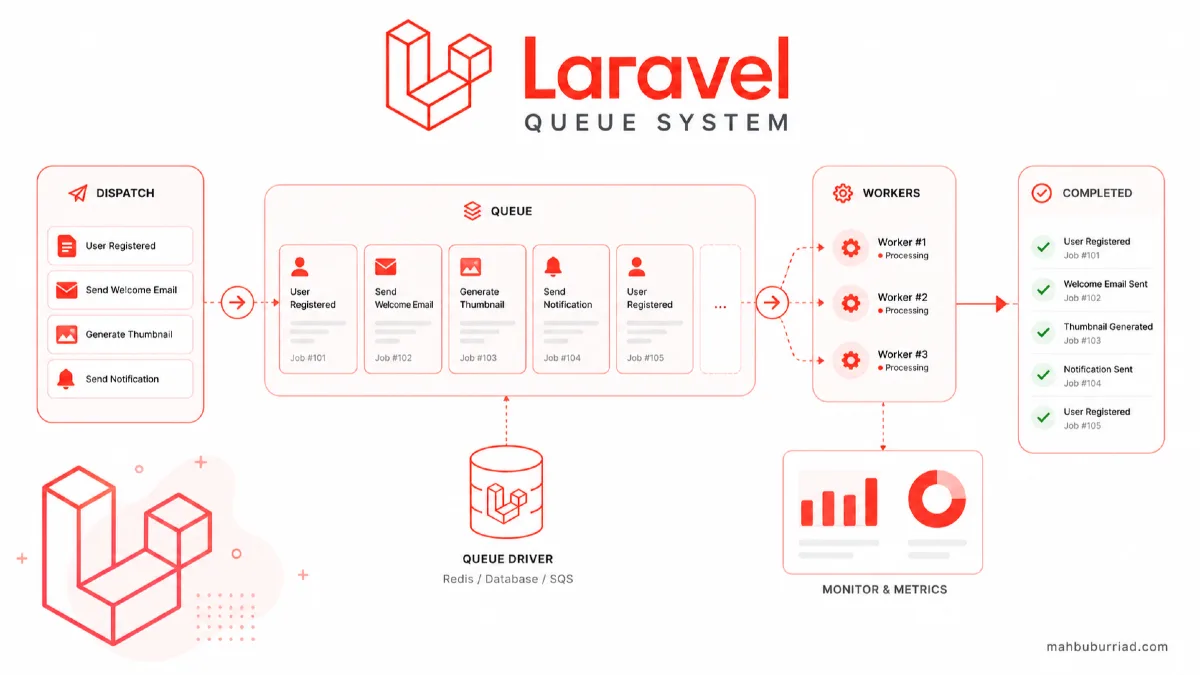
Handling resource-intensive tasks in web applications can be challenging, especially under heavy load. Laravel's queue system, combined with Redis, provides a robust solution for deferring these tasks. Let's dive into how to set this up effectively.
Why Use Queues in Laravel?
Queues allow you to defer time-consuming tasks like sending emails, processing images, or generating reports to be executed in the background. This improves your application's response time and user experience.
Benefits of Using Redis as Queue Driver
- In-memory data store for blazing-fast performance
- Built-in support for Laravel
- Reliable job processing
- Real-time monitoring capabilities
- Automatic retries for failed jobs
Setting Up Laravel with Redis
First, ensure you have the required PHP extensions:
sudo apt-get install php-redis
Install the Redis server:
# For Ubuntu/Debian
sudo apt-get install redis-server

# For macOS using Homebrew
brew install redis
Start the Redis service:
sudo systemctl enable redis-server
sudo systemctl start redis-server
Configuring Laravel to Use Redis
Update your .env file:
QUEUE_CONNECTION=redis

REDIS_HOST=127.0.0.1
REDIS_PASSWORD=null
REDIS_PORT=6379
Install the Redis PHP extension:
composer require predis/predis
Creating Your First Queue Job
Generate a new job:
php artisan make:job ProcessUserSignup
Implement the job logic:
<?php

namespace App\Jobs;

use App\Models\User;
use Illuminate\Bus\Queueable;
use Illuminate\Contracts\Queue\ShouldQueue;
use Illuminate\Foundation\Bus\Dispatchable;
use Illuminate\Queue\InteractsWithQueue;
use Illuminate\Queue\SerializesModels;

class ProcessUserSignup implements ShouldQueue
{
    use Dispatchable, InteractsWithQueue, Queueable, SerializesModels;

    public $user;

    public function __construct(User $user)
    {
        $this->user = $user;
    }

    public function handle()
    {
        // Send welcome email
        Mail::to($this->user->email)->send(new WelcomeEmail($this->user));

        // Create user profile
        $this->user->profile()->create([
            'bio' => 'Welcome to our platform!',
            'avatar' => 'default-avatar.png'
        ]);

        // Trigger analytics event
        Analytics::track('User Signed Up', [
            'user_id' => $this->user->id,
            'email' => $this->user->email
        ]);
    }
}
Dispatching Jobs
Dispatch a job from your controller:
public function store(Request $request)
{
    $user = User::create($request->validated());

    // Dispatch the job
    ProcessUserSignup::dispatch($user);

    return response()->json(['message' => 'User created successfully'], 201);
}
Queue Workers
Start a queue worker:
php artisan queue:work
For production, use a process manager like Supervisor to keep the queue worker running:
[program:laravel-worker]
process_name=%(program_name)s_%(process_num)02d
command=php /path/to/your/app/artisan queue:work redis --sleep=3 --tries=3
autostart=true
autorestart=true
stopasgroup=true
killasgroup=true
user=forge
numprocs=8
redirect_stderr=true
stdout_logfile=/home/forge/app.com/worker.log
stopwaitsecs=3600
Monitoring Queues
Horizon Dashboard
Laravel Horizon provides a beautiful dashboard for monitoring your queues:
composer require laravel/horizon
Publish the Horizon assets:
php artisan horizon:install
php artisan horizon:publish
Start Horizon:
php artisan horizon
Queue Metrics
Track queue performance with metrics:
// app/Providers/AppServiceProvider.php

public function boot()
{
    Queue::before(function (JobProcessing $event) {
        // Job is starting
        Metrics::increment('jobs.started');
    });

    Queue::after(function (JobProcessed $event) {
        // Job completed successfully
        Metrics::increment('jobs.processed');
    });
}
Performance Optimization
Queue Configuration
Adjust these settings in config/queue.php for better performance:
'redis' => [
    'driver' => 'redis',
    'connection' => 'default',
    'queue' => env('REDIS_QUEUE', 'default'),
    'retry_after' => 90,
    'block_for' => 5,
    'after_commit' => true,
],
Batch Processing
For processing large datasets, use job batching:
$batch = Bus::batch([
    new ProcessPodcast(Podcast::find(1)),
    new ProcessPodcast(Podcast::find(2)),
    // ...
])->then(function (Batch $batch) {
    // All jobs completed successfully
})->catch(function (Batch $batch, Throwable $e) {
    // First batch job failure detected
})->finally(function (Batch $batch) {
    // The batch has finished executing
})->dispatch();
Comparison Table: Queue Drivers
| Feature | Redis | Database | Beanstalkd | Amazon SQS |
|---|---|---|---|---|
| Speed | ⚡⚡⚡⚡⚡ | ⚡⚡ | ⚡⚡⚡⚡ | ⚡⚡⚡ |
| Persistence | ✅ | ✅ | ❌ | ✅ |
| Monitoring | Good | Basic | Good | Excellent |
| Setup Complexity | Medium | Easy | Hard | Easy |
| Best For | Most apps | Small apps | High perf | Cloud apps |
Common Pitfalls and Solutions
1. Memory Leaks
Long-running queue workers can cause memory leaks. Restart them periodically:
# In your deployment script
php artisan queue:restart
2. Failed Jobs
Handle failed jobs gracefully:
# Retry all failed jobs
php artisan queue:retry all

# Process failed jobs
php artisan queue:failed
3. Queue Priority
Prioritize important jobs:
// High priority queue
ProcessPayment::dispatch($order)->onQueue('high');

// Start worker for high priority queues first
php artisan queue:work --queue=high,default
FAQ
Q1: How many queue workers should I run?
A: A good starting point is 2-4 workers per CPU core. Monitor your server's CPU and memory usage to find the optimal number.
Q2: What's the difference between queue:work and queue:listen?
A: queue:work is more efficient as it keeps the application bootstrapped in memory. queue:listen is better for development as it automatically restarts on code changes.
Q3: How do I handle job timeouts?
A: Set a timeout property in your job class:
public $timeout = 120; // 2 minutes
Q4: Can I schedule queue workers?
A: Yes, you can use Laravel's task scheduler to run queue workers during specific times:
// app/Console/Kernel.php

protected function schedule(Schedule $schedule)
{
    $schedule->command('queue:work --stop-when-empty')
             ->hourly();
}
Q5: How do I test queued jobs?
A: Use Laravel's testing helpers:
// In your test
Bus::fake();

// Assert a job was dispatched
Bus::assertDispatched(ProcessUserSignup::class);
Conclusion
Implementing Laravel queues with Redis is a game-changer for high-traffic applications. It allows you to handle background tasks efficiently, improve response times, and scale your application effectively. Remember to monitor your queues and adjust the configuration based on your application's needs. For more Laravel tips and tutorials, visit mahbuburriad.com.
Remember to always test your queue setup in a staging environment before deploying to production, and keep an eye on your Redis memory usage to prevent any unexpected issues.